-
Created by
 European Dynamics Trans Contractor, last updated on Jul 06, 2026
2 minute read
European Dynamics Trans Contractor, last updated on Jul 06, 2026
2 minute read
Navigate to Statistics Console > Logs > Free Text Search Logs.
The application will present a search form with criteria related to the messages exchanged between EIS and MS/ES systems.
The message types supported are the following:
- MS2SSN_Ship_Not">MS2SSN_Ship_Not
- MS2SSN_PortPlus_Not">MS2SSN_PortPlus_Not
- MS2SSN_IncidentDetail_Not">MS2SSN_IncidentDetail_Not
- ES2SSN_IncidentDetail_Not">ES2SSN_IncidentDetail_Not
- MS2SSN_Exemption_Not">MS2SSN_Exemption_Not
- ES2CSD_ShipParticulars_Not">ES2CSD_ShipParticulars_Not
- MS2SSN_Ship_Req">MS2SSN_Ship_Req
- ES2SSN_Ship_Req">ES2SSN_Ship_Req
- MS2SSN_ShipCall_Req">MS2SSN_ShipCall_Req
- MS2SSN_ShipParticulars_Req">MS2SSN_ShipParticulars_Req
- ES2SSN_ShipCall_Req">ES2SSN_ShipCall_Req
- MS2SSN_IncidentReport_Req">MS2SSN_IncidentReport_Req
- ES2SSN_IncidentReport_Req">ES2SSN_IncidentReport_Req
- MS2SSN_Exemption_Req">MS2SSN_Exemption_Req
- MS2SSN_Ship_Res">MS2SSN_Ship_Res
- MS2SSN_ShipCall_Res">MS2SSN_ShipCall_Res
- SSN2MS_Ship_Req">SSN2MS_Ship_Req
- SSN2MS_ShipCall_Req">SSN2MS_ShipCall_Req
- SSN2MS_Ship_Res">SSN2MS_Ship_Res
- SSN2ES_Ship_Res">SSN2ES_Ship_Res
- SSN2MS_ShipCall_Res">SSN2MS_ShipCall_Res
- SSN2MS_ShipParticulars_Res">SSN2MS_ShipParticulars_Res
- SSN2ES_ShipCall_Res">SSN2ES_ShipCall_Res
- SSN2MS_IncidentReport_Res">SSN2MS_IncidentReport_Res
- SSN2ES_IncidentReport_Res">SSN2ES_IncidentReport_Res
- SSN2MS_Exemption_Res">SSN2MS_Exemption_Res
- SSN_Receipt">SSN_Receipt
- SSN2MS_IncidentDetail_Tx">SSN2MS_IncidentDetail_Tx
- SSN2MS_IncidentDetail_Tx_Ack">SSN2MS_IncidentDetail_Tx_Ack
- SSN2MSRequests_MRS_Req">SSN2MSRequests_MRS_Req
- SSN2MSRequests_MRS_Res">SSN2MSRequests_MRS_Res
- SSN2MSRequests_ShipCall_Req">SSN2MSRequests_ShipCall_Req
- SSN2MSRequests_ShipCall_Res">SSN2MSRequests_ShipCall_Res
- MS2SSN_ShipParticulars_Sub">MS2SSN_ShipParticulars_Sub
- SEG2SSN_Enrichment_Req">SEG2SSN_Enrichment_Req
- SEG2SSN_Exemption_Req">SEG2SSN_Exemption_Req
- SSN2SEG_Enrichment_Res">SSN2SEG_Enrichment_Res
- SSN2SEG_Exemption_Res">SSN2SEG_Exemption_Res
- ES2SSN_ListOfMRS_Req">ES2SSN_ListOfMRS_Req
- SSN2ES_ListOfMRS_Res">SSN2ES_ListOfMRS_Res
- MS2SSN_Ship_List_Req">MS2SSN_Ship_List_Req
- SSN2MS_Ship_List_Res">SSN2MS_Ship_List_Res
- userInfo
- userInfoRequest
- userInfoResponse
- getCodes
- getCodesResponse
- getInspectionDetails
- getInspectionDetailsResponse
- IDM_UserInfo
- MS2SSN_IntShip_Req">MS2SSN_IntShip_Req
- SSN2ES_PRFRep_Req">SSN2ES_PRFRep_Req
- MS2SSN_PortCallShip_Req">MS2SSN_PortCallShip_Req
- MS2SSM_PortCallShipCall_Req">MS2SSM_PortCallShipCall_Req
- MS2SSN_IncidentByCountry_Req">MS2SSN_IncidentByCountry_Req
- MS2SSN_DistIncidents_Req">MS2SSN_DistIncidents_Req
- MS2SSN_IncidentArea_Req">MS2SSN_IncidentArea_Req
- MS2SSN_ExemptionOnPort_Req">MS2SSN_ExemptionOnPort_Req
- SSN2MS_ShipParticulars_Ann">SSN2MS_ShipParticulars_Ann
- SSN2ES_ShipParticulars_Ann">SSN2ES_ShipParticulars_Ann
- CSD2ES_ShipParticulars_Ann">CSD2ES_ShipParticulars_Ann
- SSN2ES_IncidentUpdateEvent_Ann">SSN2ES_IncidentUpdateEvent_Ann
- SSN2ES_MrsUpdateEvent_Ann">SSN2ES_MrsUpdateEvent_Ann
- SSN2ES_ShipParticularsPropagation_Ann">SSN2ES_ShipParticularsPropagation_Ann
- SSN2ES_VoyageUpdateEvent_Ann">SSN2ES_VoyageUpdateEvent_Ann
Among the search criteria there is also the Free Text field which can be used to further narrow down the results.
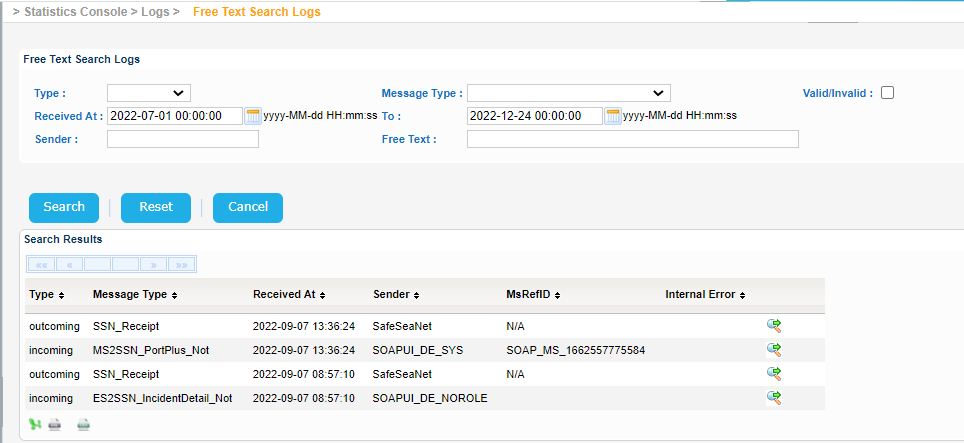
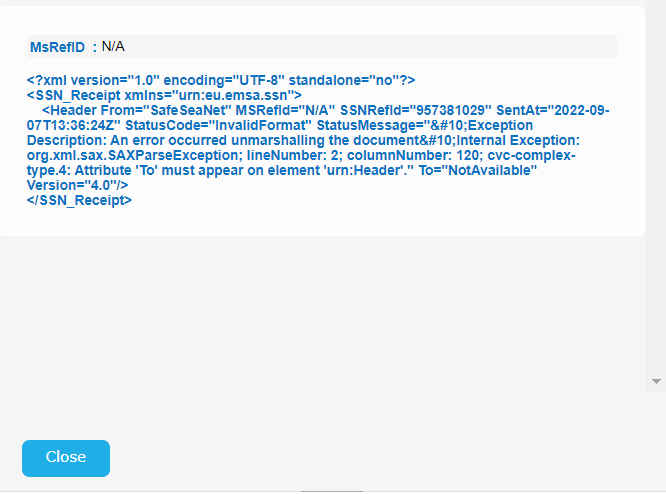
Select one of the search results and click on green icon on the right side of the table with the "Show xml message" tooltip.
A new pop up window is presented with the actual XML message.
Export the search results in Excel, XML, CSV format by clicking on the respective icon on the bottom left side of the search results table.

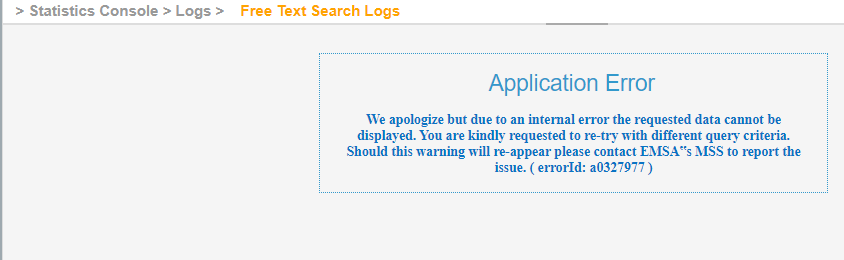
In case of an error during the export process you will get an error like the following one: