
-
Created by
 European Dynamics Trans Contractor, last updated on Jul 16, 2026
1 minute read
European Dynamics Trans Contractor, last updated on Jul 16, 2026
1 minute read
Navigate to Management Console > Application Management > Notification Parameters.
The application will present a list of Notification Parameters along with the respective values.
Select any of them, update the parameter value and click on the Update button to store the changes in the database.
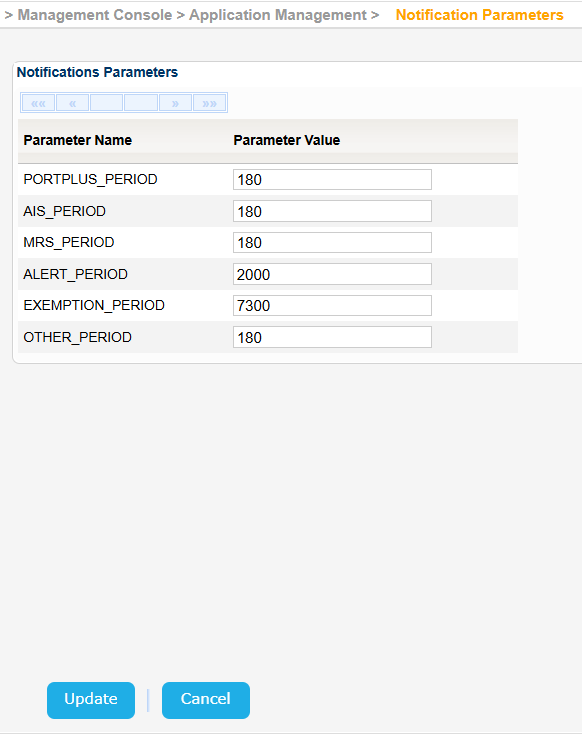
The system uses the above parameters as retention period for the various message types. Messages older than the retention period are stored in the Long Term Archive in the cloud and deleted from EIS. The association between the message types and the respective retention period is the following:
| Message Type | Notification Parameter | Retention Period in Days |
|---|---|---|
| MS2SSN_Ship_Not | MRS_PERIOD | 180 |
| MS2SSN_PortPlus_Not | PORTPLUS_PERIOD | 180 |
| MS2SSN_Exemption_Not | EXEMPTION_PERIOD | 7300 |
| MS2SSN_IncidentDetail_Not | ALERT_PERIOD | 2000 |
| All other types | OTHER_PERIOD | 180 |
The retention period for ES2SSN_IncidentDetail_Not is the same as that for MS2SSN_IncidentDetail_Not.
AIS_PERIOD will be removed once the v4 Services are decommissioned.
The PORTPLUS_PERIOD is used also by the Voyage Correlation process which does not take into consideration PortPlus Notifications older than the configured number of days, when these Notifications are associated with a particular Voyage.